Rank 1 Rebooking operations for trade shows

Every exhibitor,
every show day,
one queue.

The operations system behind rebooking at trade shows, on site, online or hybrid: from the priority list and the check-in queue to the operator's screen and the order in your CRM. Any number of exhibitors, any number of days.

For show organisers who rebook in rank order.

LIVE
Mon 14 Sep · 10:00 – 10:20
10:03:17
Now serving ranks 663 – 687
Booked in slot 17 / 26 · 65%
    Next 10:20 – 10:40 · ranks 688 – 712 Refresh 5 s

    Waiting-area board, as the exhibitors see it. Live demo data.

    • Anynumber of exhibitors on one priority list
    • Anynumber of rebooking days, in time slots over rank bands
    • 0ways to rebook: on site, online or hybrid
    • 0modules, one login, one list
    • 0-secqueue refresh, every screen live

    01 How a rebooking day runs

    Points decide the rank. The rank decides the slot.
    The slot decides the queue.

    Every exhibitor earns priority points from their history with your show. rebooking.live turns those points into a plan for the day and keeps the whole chain moving, live, on every screen at the desk and on the floor.

    1. Weeks before

      1 Priority list and slot plan

      Points and ranks come in from the exhibitor history, time slots are laid over the rank bands for as many days as the show needs, pre-rebooking exhibitors and new customers get their own windows. Exhibitors receive their portal login by e-mail.

    2. 10:00

      2 Slots follow the clock

      A slot opens at its start time, or a manager opens it early or closes it. The Priority List marks the current and the next slot and shows "17 booked (65%)" per slot and per day.

    3. 10:02

      3 Check-in at the Q desk

      Staff find the exhibitor, tap once, and they join the queue in rank order. A VIP check-in tells the manager at once. Proxies, exhibitors who left instructions instead of coming, are queued automatically in their own slot.

    4. 10:05

      4 Next Customer

      An operator presses one button and the next exhibitor by rank is theirs, or searches a company and takes them directly. The waiting-area screens show who is called to which desk. Remote exhibitors see the call in the portal and join the operator's video room.

    5. 10:08

      5 One screen for the conversation

      Company history and stands, the current order and where it stands, the price list for this exhibitor's rate, the growth discount, the booking note, and the hand-over to your CRM, one button away.

    6. 10:19

      6 Booked, not booked, no show

      The result goes back to the list and to everyone following that company on Telegram. Exhibitors who did not turn up land with the runners for a visit at their stand.

    7. 18:00

      7 Follow-up and figures

      Runners, hall teams and escalation lists work through the open cases. The statistics page shows booking speed per operator and per rank tier, revenue per operator, and how spending compares with last year.

    Scroll along the day

    02 Why organisers step up

    Three things a paper list and a shared spreadsheet cannot give you.

    Most shows already rebook by priority. The hard part is running it on the day: keeping the order fair, keeping every desk fast, and knowing what is going on without walking the hall.

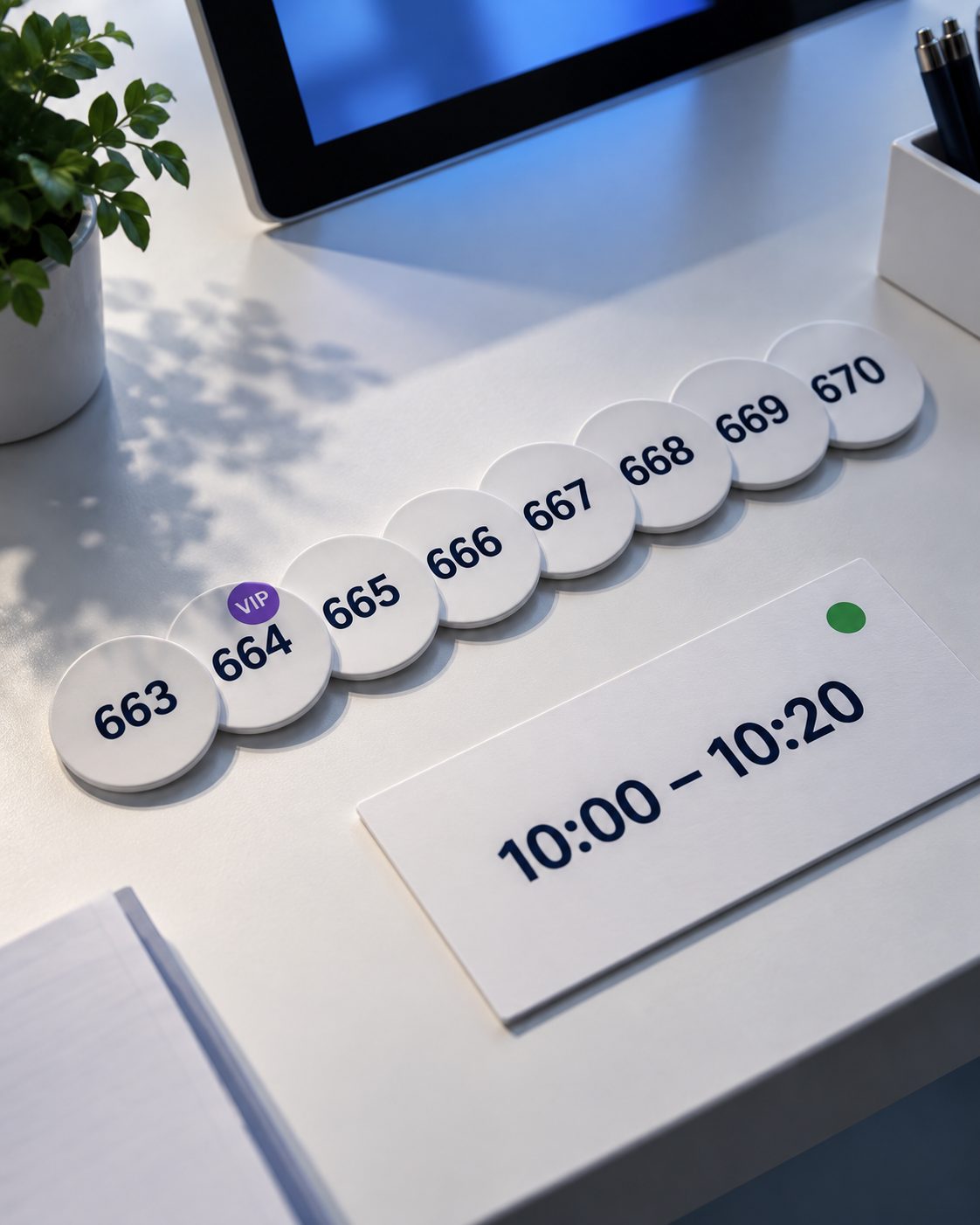
    Numbered rank tokens laid out in order on a desk

    1 Order

    Points, ranks and slots decide who goes first.

    • Priority points from the exhibitor's history, a rank for every company
    • Twenty-minute slots laid over the rank bands, opened by the clock or by hand
    • VIP, pre-rebooking and proxy exhibitors handled in the same list

    An operator and an exhibitor at a rebooking desk, one screen between them

    2 Speed

    One button per step, everything on one screen.

    • Next Customer by rank, at the desk or in the video room, or take any company by search
    • History, stands, order status, prices and the CRM hand-over in one view
    • Early Bird or On Site rate and the growth discount applied for you
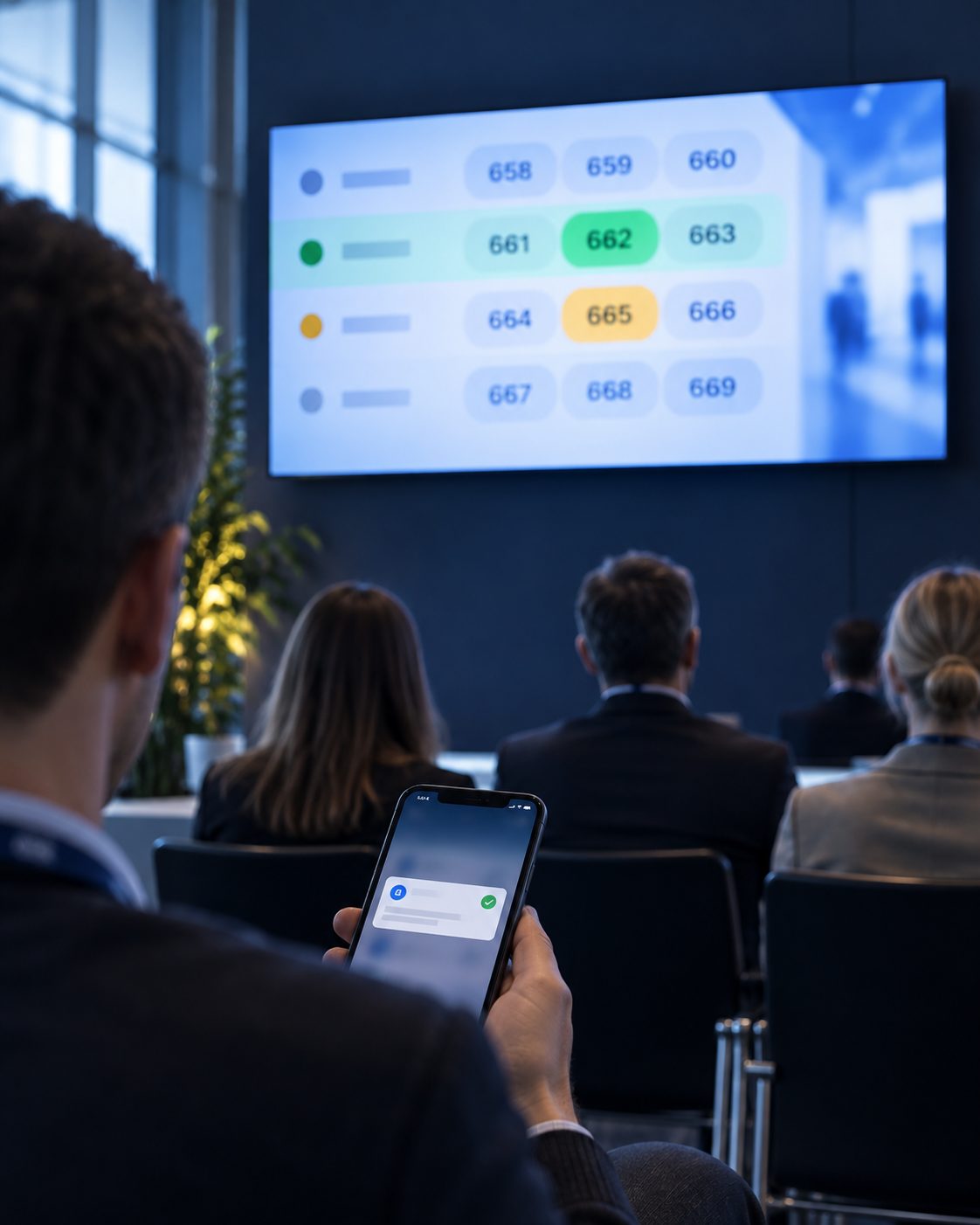
    A waiting area with a large queue monitor, and a phone showing an alert

    3 Sight

    Live monitors, phone alerts, statistics.

    • Waiting-area screens show who is free, who is called and who is waiting
    • Telegram alerts for VIP check-ins, help requests and watched companies
    • Booking speed and revenue per operator, spending against last year

    03 The desk, screen by screen

    Every role gets the one screen it needs.

    Thirteen staff modules share one priority list and one queue, and an exhibitor portal sits in front of them. Six of the modules do most of the work on a rebooking day. All of them run in the browser, on a desk computer, an iPad or a phone.

    For everyone

    Priority List

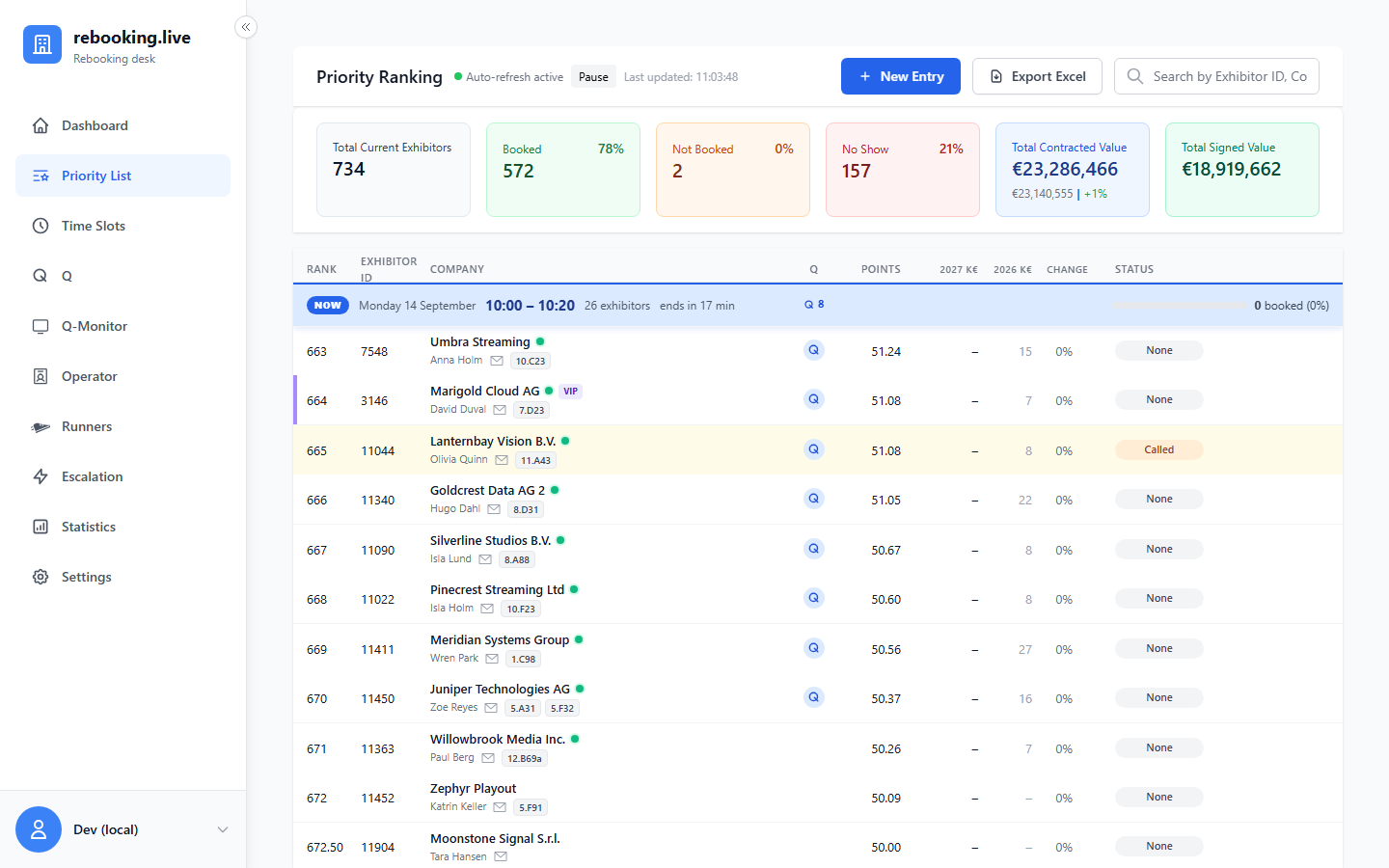
    The live list of all exhibitors, grouped by day and slot and following the clock. This year's order sits next to last year's total and last year's booth numbers, so nobody has to look anything up. Search, Excel export, incremental refresh that keeps thousands of rows quick on an iPad.

    1. 1 The NOW band follows the clock: current slot, exhibitors, minutes left, booked share.
    2. 2 A Q marker shows who is already waiting at the desk.
    3. 3 Badges for VIP, pre-rebooking and proxy. A green dot marks the Early Bird rate.
    4. 4 Status per company: none, called, booked, not booked, no show.
    rebooking.live / priority-list
    Priority List screen: a NOW band for the 10:00 to 10:20 slot, then exhibitors by rank with company, contact, booth numbers, Q markers, points and status 1 2 3 4

    For operators

    Operator screen

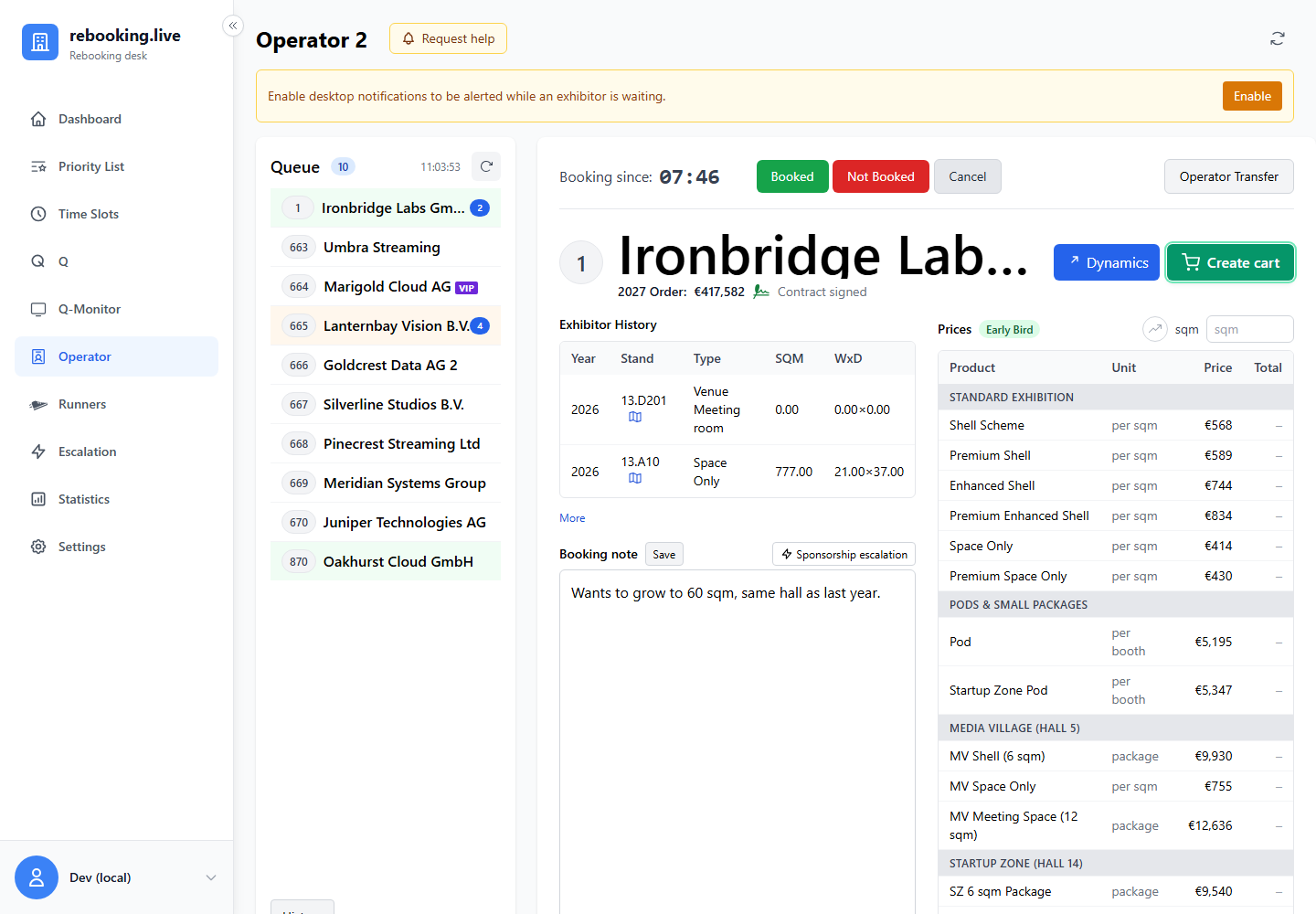
    One button takes the next exhibitor by rank. Then the whole conversation happens on one screen: history and stands, the current order and where it stands, the price list for this exhibitor's rate with per-sqm totals, the booking note. Request help from a colleague by Telegram, escalate a sponsorship request, join the video room.

    1. 1 The queue in rank order. Next Customer takes the top, or search and take any company.
    2. 2 Case timer and one-tap outcome: Booked, Not booked, Cancel.
    3. 3 Hand the order to your CRM and jump to the company record, set up for the way you sign.
    4. 4 Prices by rate, Early Bird or On Site, with the growth discount.
    rebooking.live / operator
    Operator screen: the queue on the left, the exhibitor's history, order status, booking note and price list on the right, with Booked and Not booked buttons and buttons to the CRM 1 2 3 4

    For reception

    Q desk

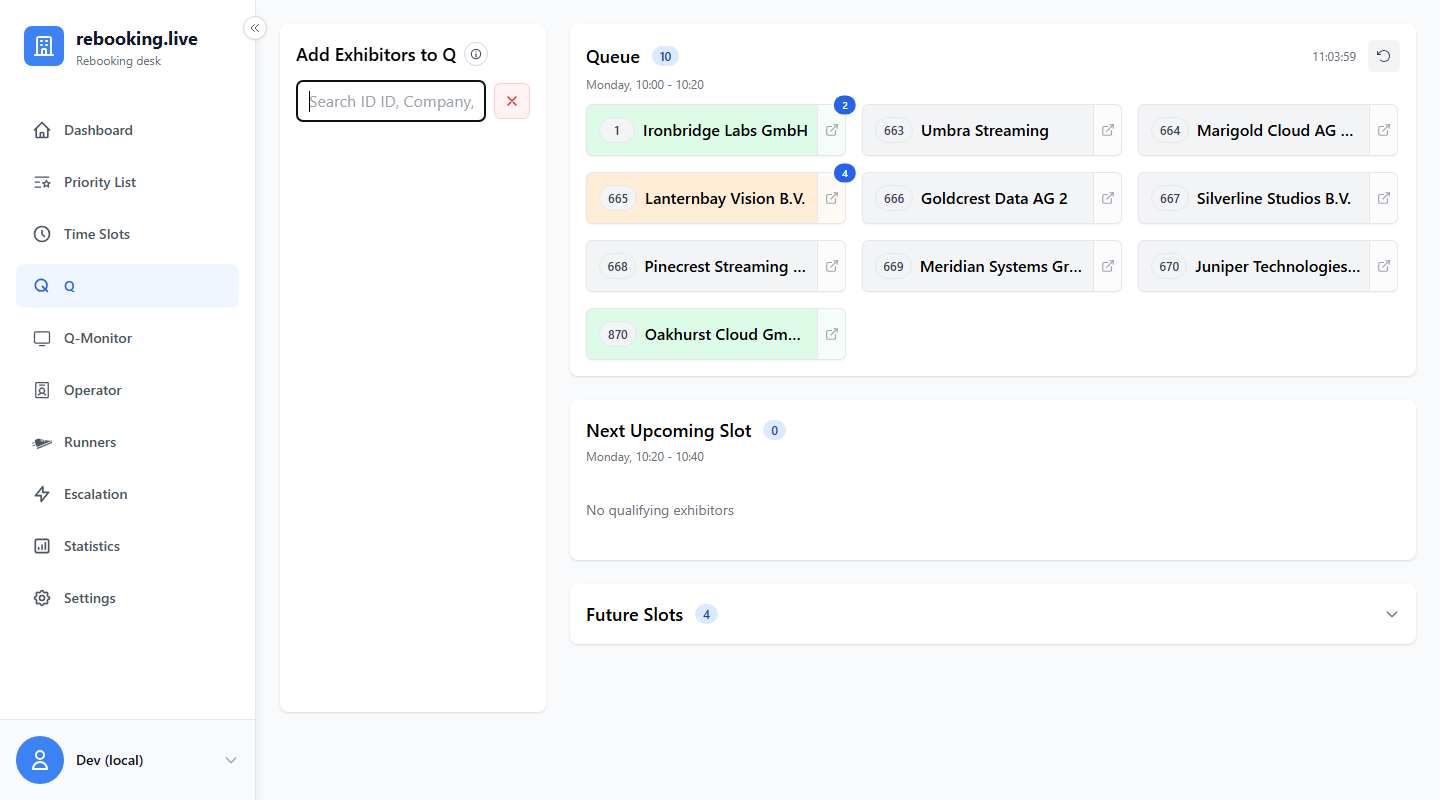
    Check-in for arriving exhibitors. Search by company, exhibitor ID, contact or rank, tap once, and they are in the queue. The queue, the next slot and the future slots sit side by side, a CRM tab is on every card, and a VIP check-in notifies the manager. Designed for an iPad at the entrance.

    1. 1 Find by company, exhibitor ID, contact or rank. One tap checks them in.
    2. 2 The queue in rank order, with a CRM tab on every card.
    3. 3 Next slot and future slots, so the desk sees what is coming.
    rebooking.live / q
    Q desk screen: a search box to add exhibitors, the current queue as cards with rank chips, and the next upcoming slot below 1 2 3

    For the waiting area

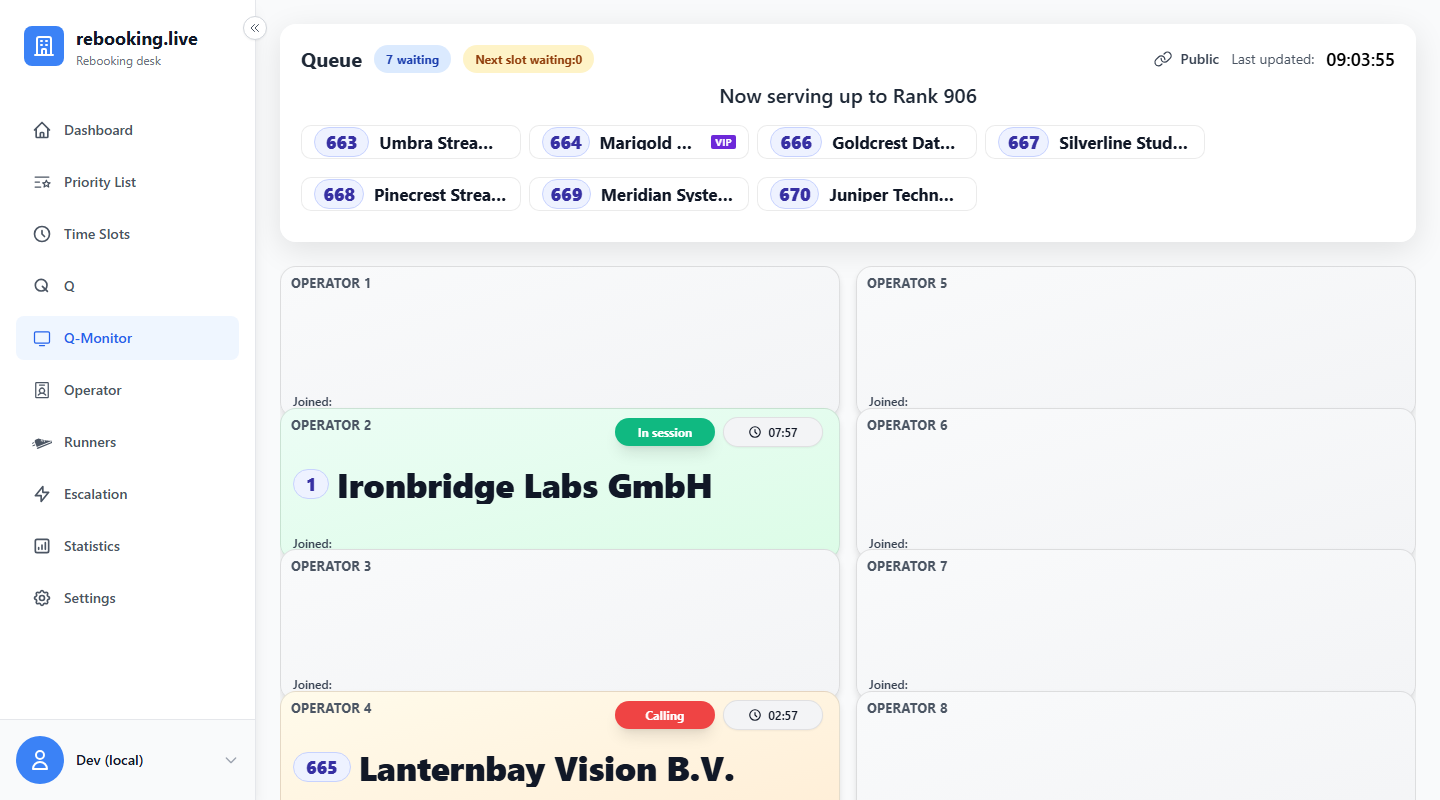
    Q-Monitor and queue display

    Large-screen views for the waiting area: which operator is free, who is called to which desk, who is waiting, and up to which rank the desk is serving. When an operator asks for help, their chip blinks so the manager sees it from across the room. A public version can run on any screen without a login.

    1. 1 "Now serving up to rank 906": the waiting area sees the queue, not a closed door.
    2. 2 Which operator is in session, with whom, and for how long.
    3. 3 Called to desk 4, in large type, so nobody misses their turn.
    rebooking.live / q-monitor
    Q-Monitor screen: seven waiting exhibitors with rank chips, a Now serving up to Rank 906 line, and eight operator panels, one In session and one Calling 1 2 3

    For exhibitors · on site, online or hybrid

    Exhibitor portal

    Rebooking does not have to happen at a desk in the hall. Exhibitors receive their login by e-mail, see their rank, their slot and their place in the queue, and when it is their turn they join their operator: at the desk if they are on site, in the operator's video room if they are not. On site, online or hybrid, it is the same queue in the same rank order.

    • 1 Login by e-mail before the show. Rank, slot and queue position at a glance.
    • 2 One button to join the operator's video room the moment they are called.
    • 3 The operator's screen is the same for a remote exhibitor as for one at the desk.
    • 4 Cannot come at all? Leave instructions and the desk books on their behalf as a proxy.
    rebooking.live / portal
    Your rebooking · Show 2027 Marigold Cloud AG
    Rank 664
    Your slotMon 14 Sep · 10:00 – 10:20
    NOW
    1. Checked in 10:01
    2. In the queue, 2nd by rank
    3. Called to Operator 4
    4. Booked
    Join Operator 4

    Come to desk 4 if you are in the hall, or join the video room from here.

    Cannot make it? Leave instructions for the desk and we book on your behalf.

    For every user, on the phone

    Telegram alerts

    Connect a phone by QR code and choose what to hear about: VIP check-ins, raised escalations, operators asking for help. Put companies on a watchlist and get their check-in, booking start and result. Help requests arrive with answer buttons, so a colleague can say "on my way" without opening anything. All through your own bot.

    • 1 VIP check-ins go to the manager the moment they happen.
    • 2 Help requests from the desk, answered with a button.
    • 3 Watched companies: check-in, booking start, result and amount.
    • 4 Escalations with the company's booth numbers, straight to the floor team.
    Rebooking deskbot · Show 2027
    Monday
    VIP check-in

    664 Marigold Cloud AG has joined the queue.

    10:01
    Help requested

    Operator 4 asks for a colleague at desk 4.

    On my wayBusy
    10:04
    Watchlist · Booked

    1 Ironbridge Labs GmbH booked with Operator 2. Order €417,582.

    10:09
    Escalation raised

    101 Riverstone Data AG 3 · booth 10.C27 · sponsorship. "Asked for a corner position if one comes free."

    10:12

    For management

    Statistics

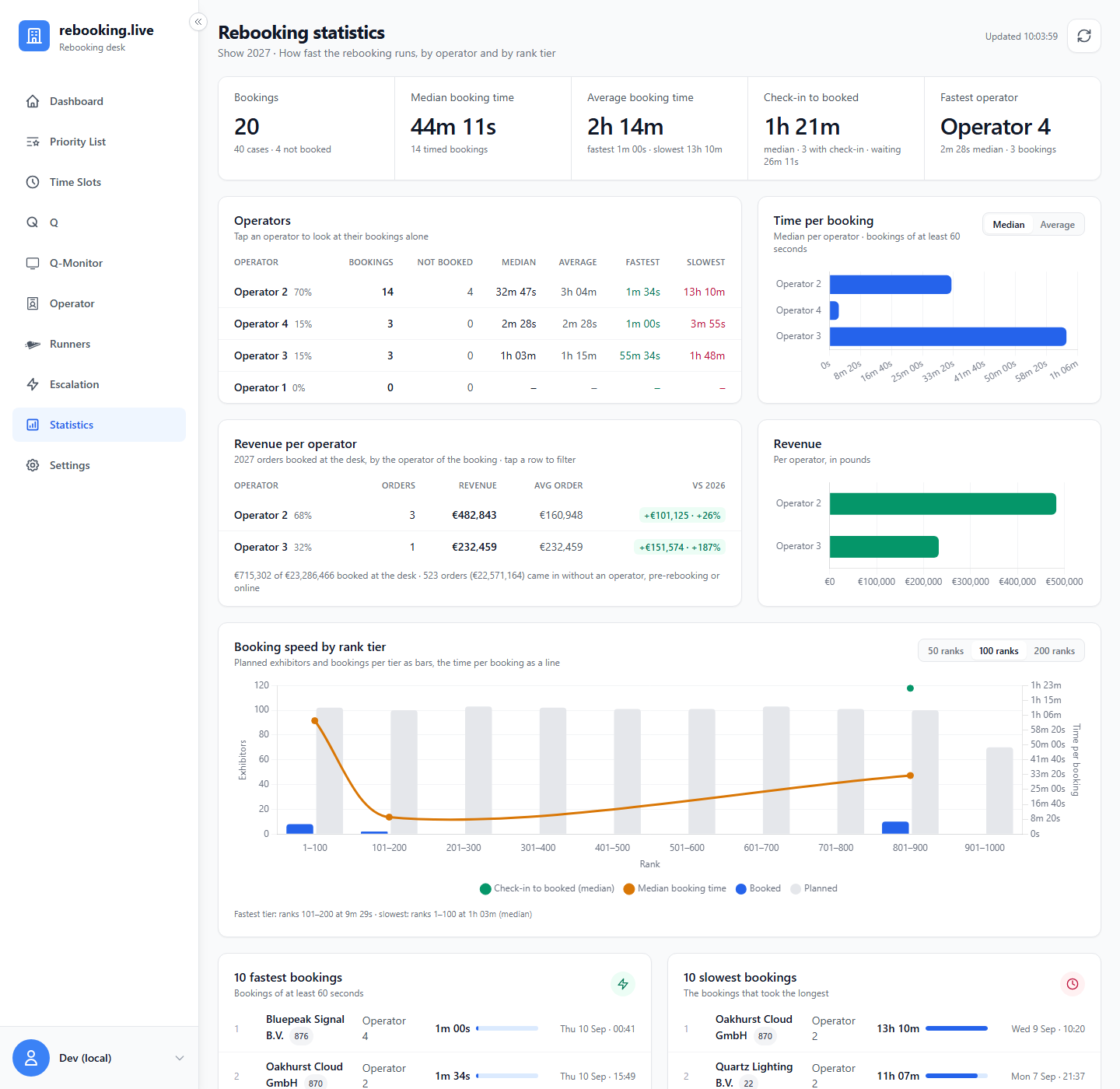
    How the days went, in numbers you can act on next year. Bookings and median time per operator, speed per rank tier, the ten fastest and slowest bookings, bookings per hour, revenue per operator, and the biggest increases and reductions against last year.

    1. 1 Median and average time per booking, fastest and slowest case.
    2. 2 Bookings, median, fastest and slowest per operator. Tap a row to filter.
    3. 3 Revenue per operator and the change against last year.
    4. 4 Booking speed by rank tier: where the day slows down and where it flies.
    rebooking.live / statistics
    Statistics screen: bookings, median and average booking time, a table per operator, revenue per operator and a chart of booking speed by rank tier 1 2 3 4

    04 When the exhibitor cannot come

    A missed slot is not a lost booking.

    Some exhibitors cannot leave their stand, some are not at the show at all. rebooking.live has a path for both, and the runners on the floor close the loop with the desk.

    Proxy booking

    An exhibitor who cannot come leaves instructions instead: which hall, how much space, what matters to them. The proxy is queued automatically in the exhibitor's own slot, the instructions per hall sit in the Priority List detail window, and the operator books on their behalf, in rank order like everyone else.

    • Proxy badge in the Priority List, instructions per hall in the detail window
    • Queued automatically when the slot opens, no check-in needed
    • Result and amount go back to the list and to Telegram like any other booking

    Runners on the floor

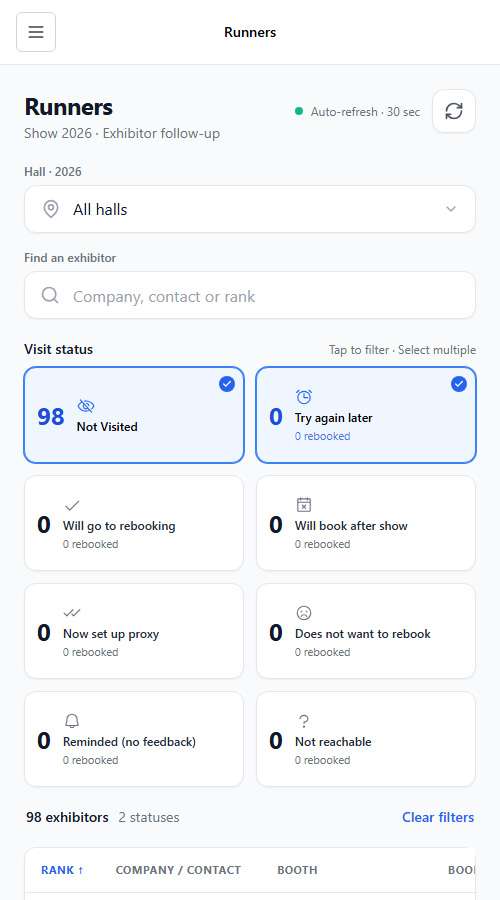
    Exhibitors who miss their slot land on the runners' list automatically. A runner walks to the stand, the booth number links to the floor plan, and records the outcome on the phone. The desk sees it at once, and the exhibitor comes back into the queue, becomes a proxy, or is booked after the show.

    • Outcomes per company: will come to rebooking, now set up proxy, will book after the show, does not want to rebook, not reachable
    • Notes and a visit status per company, filtered by hall, shared by the whole floor team
    • One Escalate button: the case reaches management and subscribed phones on Telegram with the booth numbers
    Runners page on a phone: visit status tiles such as Not visited, Try again later, Will go to rebooking, Now set up proxy, and a filter by hall

    Runners, on the phone. Filter by hall, tap a status, escalate if needed. The desk sees it live.

    05 And the rest of the desk

    Management sees the whole day. Floor teams see their part of it.

    Seven more modules cover what happens around the desk: the plan before, the follow-up after, and the settings that make next year's rollover a one-file change.

    rebooking.live / dashboard
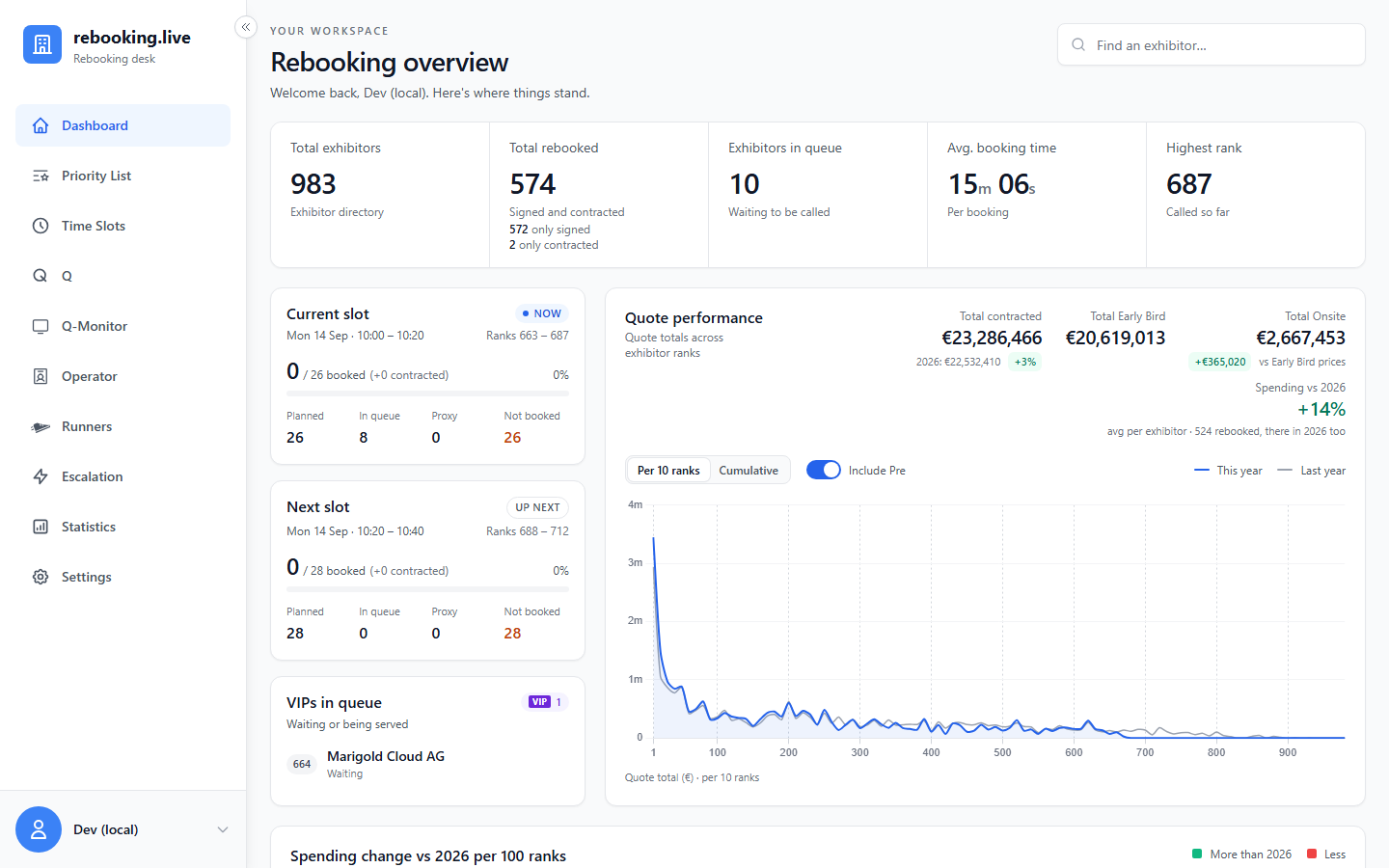
    Dashboard: total exhibitors, total rebooked, exhibitors in queue, average booking time, current and next slot, VIPs in queue, and a chart of quote totals per ten ranks against last year

    Dashboard. Exhibitors, rebooked, queue length, average booking time, current and next slot, VIPs waiting, total contracted against last year, average change in spending per exhibitor overall and per 100 ranks.

    • Time Slots

      The slot plan over the rank bands. Slots open by the clock or by hand, can be closed, and can be marked open for new customers.

    • Runners

      Exhibitors who missed their slot, with a visit status per company, notes, the floor-plan link to their stand, and an Escalate button. Phone-first.

    • Hall lists

      Exhibitors placed in or asking for a hall, with meeting times, a marked or done status, that hall's prices for the exhibitor's rate, option sheets to download, and an iPad layout.

    • Escalation

      Runner and sponsorship escalations in one list with status, tag and note. New ones reach subscribed phones on Telegram with the company's booth numbers.

    • Team lists

      A curated set of exhibitors for any team, on the phone: rank, slot, booth numbers, rate and the price list with per-sqm totals. Admins paste exhibitor IDs to maintain it.

    • Settings

      Users with roles and per-module access, operators with their video rooms, e-mail server, Telegram bot and channel, CRM connection, rebooking-day parameters.

    The Q, hall, runner and team-list screens are designed phone- and tablet-first, so the follow-up happens at the stand, not back at the desk.

    06 Integrations

    The order lands in your CRM. The alert lands on your phone.

    rebooking.live is the desk, not another system of record. The order lives in your CRM, and how the desk talks to it is set up for your CRM and for the way your contracts are signed.

    • Your CRM

      Orders and quotes flow between the desk and your CRM. How far that goes depends on your CRM and on how you sign: from a link to the company record up to creating the order from the operator's screen. We set it up with you.

    • Telegram

      Alerts, watchlists and help requests through your organisation's own bot. Phones connect by QR code.

    • Floor plan

      Every stand number links to its place on the hall plan, from the list, the operator screen and the runners' phones.

    • E-mail

      Login details for exhibitors before the show, password resets for staff, from your own mail server.

    • Excel

      The full priority list as a workbook, one click, for whoever still wants a spreadsheet.

    • Price sheet

      The year's Early Bird and On Site prices, transcribed once and checked automatically against the sheet.

    07 Under the hood

    Built to run on a show floor, not in a demo.

    A rebooking day has no second try. rebooking.live is plain, fast web software that is hosted in the cloud.

    • Live everywhere. Five-second queue refresh, incremental list updates that keep thousands of rows quick on an iPad.
    • Access by role. Every module can be denied per user. Management pages are limited to super admins.
    • Responsive throughout. Desk computer, iPad or phone. The Q, hall, runner and team-list screens are designed tablet- and phone-first.
    • Annual rollover in one file. Show year, baseline year and price lists live in one configuration file.

    08 Who it is for

    For show organisers who rebook in rank order.

    If your exhibitors earn a priority and your sales team meets them, at the show or online, to sign for next year, rebooking.live is the desk you have been improvising. Any number of exhibitors, any number of days. Tell us your exhibitor count, your show days and your CRM, and we will come back with a walkthrough on your own data.

    Write to contact@rebooking.live or copy the address